HKT101AMC-C
LCD Module User Manual
Prepared by:
Checked by:
Approved by:
WangRuxuan
Date: 2025-02-06
Date:
Date:
Rev. Descriptions
Edit
Release Date
0.1
Preliminary release
Gong huimei
2023-04-28
0.2
Update Outline Dimension & Outline Dwg
WangRuxuan
2025-02-06
URL: www.topwaydisplay.com
Document Name: HKT101AMC-C-Manual-Rev0.2.doc
Page: 1 of 16

TOPWAY
LCD Module User Manual
HKT101AMC-C
Table of Content
1. Basic Specification................................................................................................................................ 3
1.1 General Specification......................................................................................................................3
1.2 Block Diagram.................................................................................................................................3
1.3 Terminal Function........................................................................................................................... 4
1.3.1 UART Interface Terminal (K3)............................................................................................. 4
1.3.2 USB TYPE-C Interface Terminal (K2)................................................................................. 4
2. Absolute Maximum Ratings..................................................................................................................5
3. Electrical Characteristics......................................................................................................................5
3.1 DC Characteristics..........................................................................................................................5
4. Function Specifications........................................................................................................................ 6
4.1 Basic Operation Function Descriptions..........................................................................................6
4.2 Quick Start Guide........................................................................................................................... 7
4.3 Command Descriptions.................................................................................................................. 7
5. Optical Characteristics..........................................................................................................................8
6. LCD Module Design and Handling Precautions...............................................................................10
7. Case With Brackets Mounting ( 卡扣式安装 )......................................................................................11
Warranty....................................................................................................................................................12
Appendix A:.............................................................................................................................................. 13
URL: www.topwaydisplay.com
Document Name: HKT101AMC-C-Manual-Rev0.2.doc
Page: 2 of 16
TOPWAY
LCD Module User Manual
HKT101AMC-C
1. Basic Specification
TOPWAY HKT101AMC-C is a Smart TFT Module with 32bit MCU on board. Its graphics engine
provides numbers of outstanding features. It supports TOPWAY SGTools for preload and pre-design
display interface that simplifies the host operation and development time. Suitable for industry control,
instrumentation, medical electronics, power electric equipment applications.
1.1 General Specification
Screen Size(Diagonal) :
10.1”
Resolution :
1024(RGB) x 600
Color Depth :
65k color (16bit)
Pixel Configuration :
R.G.B Vertical Stripe
Display Mode :
TN,Normal White
Viewing Direction :
6H (*1) (gray-scale inverse)
12H (*2)
Outline Dimension :
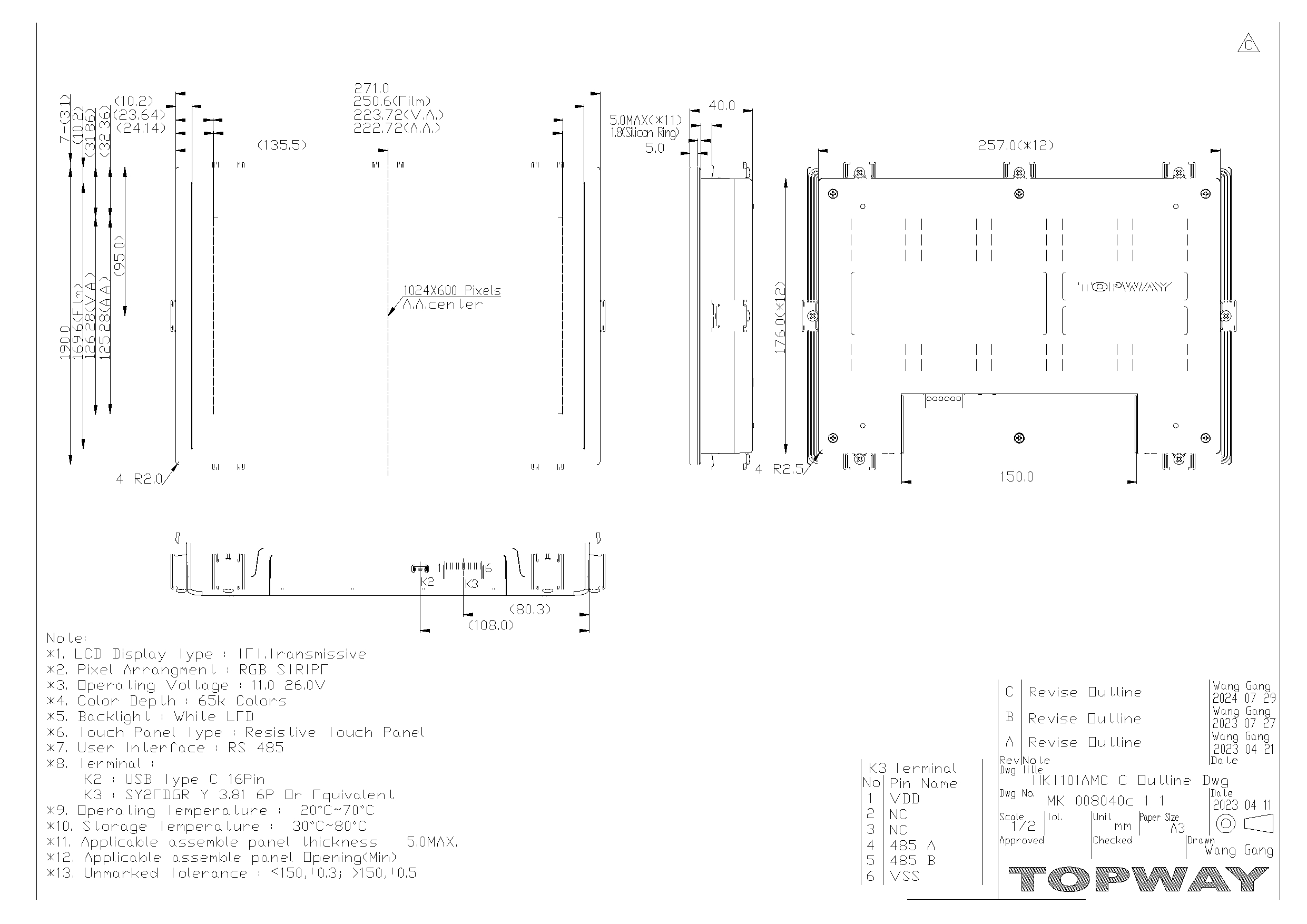
271 x 190x 40 (mm)
(see attached drawing for details)
Active Area :
222.72 x 125.28(mm)
Backlight :
LED
Command I/F :
RS485
Proiect Download :
by PC or by U-Drive (with OTG cable)
Surface Treatment :
Anti-Glare Treatment
Touch Panel:
Resistive Touch Panel
Operating Temperature :
-20 ~ +70°C
Storage Temperature :
-30 ~ +80°C
Highlight :
RTC with battery, Support 90 degrees rotation,
Lua script engine, Buzzer
Note:
*1. For saturated color display content (eg. pure-red, pure-green, pure-blue, or pure-colors-combinations).
*2. For “color scales” display content.
*3. Color tone may slightly change by Temperature and Driving Condition.
1.2 Block Diagram
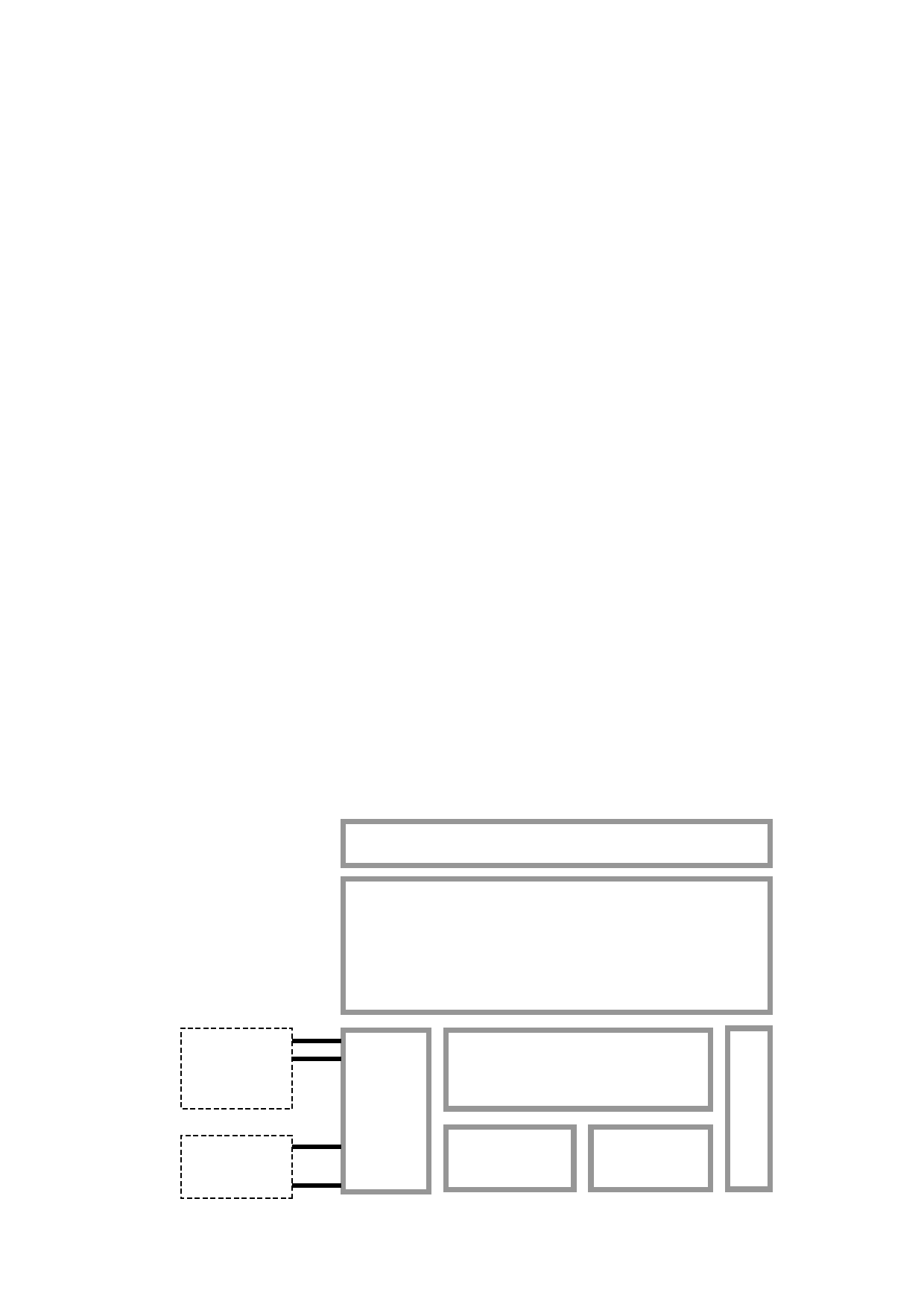
Resistive Touch Panel
10.1” TFT
1024 x 600 pixels
K3
485_A
485_B
Display Function Controller
VDD,VSS
K2
D+,D-,ID
Flash
Memory
RAM
VBUS,VSS
URL: www.topwaydisplay.com
Document Name: HKT101AMC-C-Manual-Rev0.2.doc
Page: 3 of 16

TOPWAY
LCD Module User Manual
HKT101AMC-C
1.3 Terminal Function
1.3.1 UART Interface Terminal (K3)
Pin No.
Pin Name
I/O Descriptions
1
VDD
P
Power supply
2,3
NC
NC
No connection
4
485_A
I/O
RS485 Differential Signal A
5
485_B
I/O
RS485 Differential Signal B
6
VSS
P
Ground(0V)
Note.
*1. User data and commands transfer through this terminal
1.3.2 USB TYPE-C Interface Terminal (K2)
Pin No.
Pin Name
IO
Descriptions
A1/B12
VSS
Power Power Supply GND (0V)
A4/B9
VBUS
Power Positive Power Supply(5.0V)
A5/B5
ID
I
USB_ID,1:Client , 0:HOST
A6/B6
D+
I/O USB D+ Signal
A7/B7
D-
I/O USB D- Signal
A8/B8
NC
-
No connection
B4/A9
VBUS
Power Positive Power Supply(5.0V)
A12/B1
VSS
Power Power Supply GND (0V)
Note.
*1. TML files and image files preload through this terminal.
*2. Do not connect USB TYPE-C terminal ,while VDD(K3) is present.
URL: www.topwaydisplay.com
Document Name: HKT101AMC-C-Manual-Rev0.2.doc
Page: 4 of 16
TOPWAY
LCD Module User Manual
HKT101AMC-C
2. Absolute Maximum Ratings
Items
Symbol
Min.
Max.
Unit
Condition
Power Supply voltage
V DD
-0.3
26
V
Operating Temperature
T OP
-20
70
C
No Condensation
Storage Temperature
T ST
-30
80
C
No Condensation
Note:
*1. This rating applies to all parts of the module and should not be exceeded.
*2. The operating temperature only guarantees operation of the circuit. The contrast, response speed,
and the other specification related to electro-optical display quality is determined at the room temperature, T OP =25 ℃
*3. Ambient temperature when the backlight is lit (reference value)
*4. Any stresses exceeding the Absolute Maximum Ratings may cause substantial damage to the device. Using the
display under conditions beyond those listed is not advised, which will affect device’s reliability.
3. Electrical Characteristics
3.1 DC Characteristics
VDD=12V,GND=0V, T OP =25 C
Items
Symbol
MIN.
TYP.
MAX.
Unit
Applicable Pin
Operating Voltage
V DD
11
12.0
26
V
VDD
Differential Driver Output
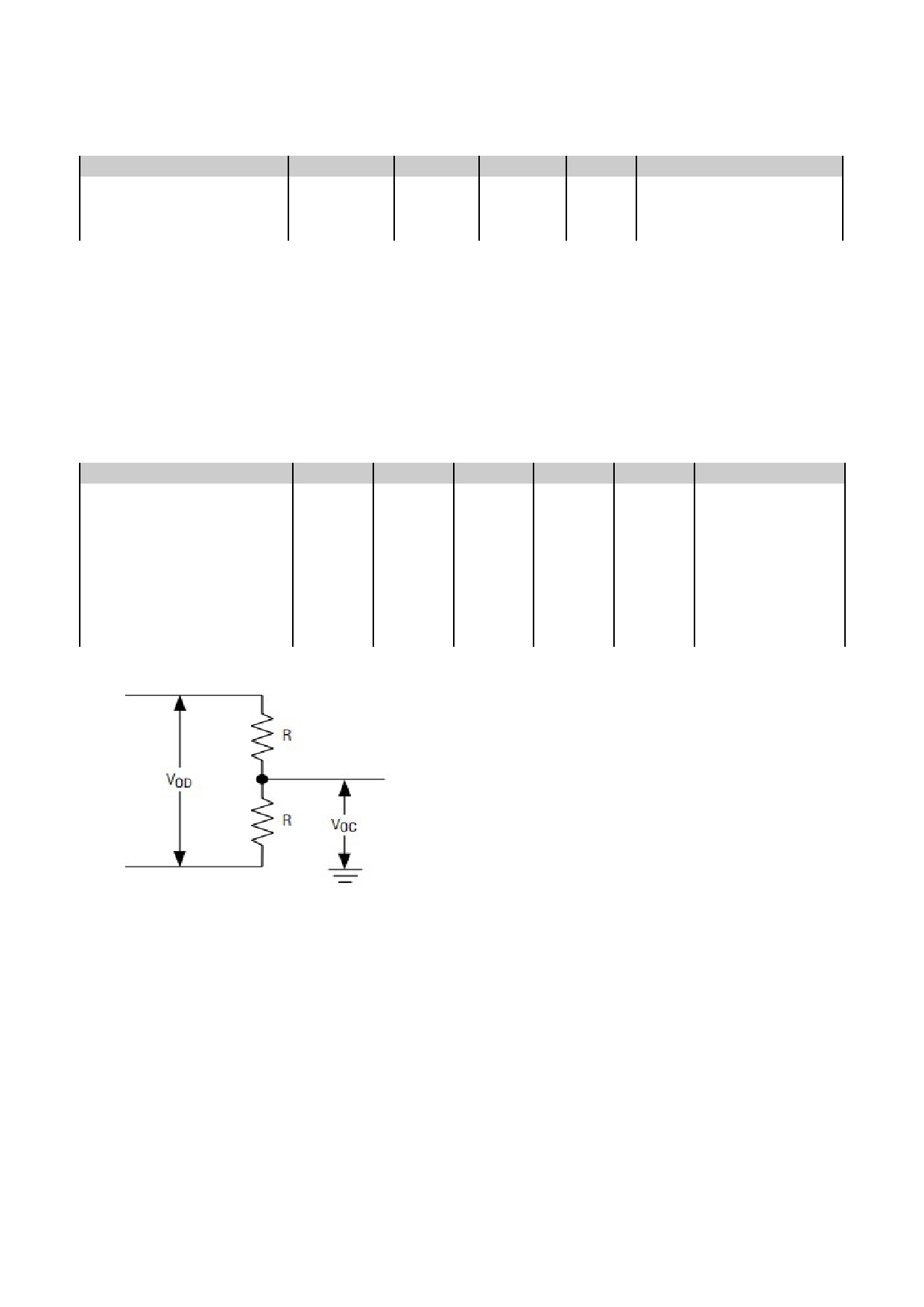
(with load) R=27 Ω (*1)
V OD
1.5
-
3.3
V
A/B
Receiver Differential
Threshold Voltage
V TH
-0.2
-
0.2
V
A/B
Operating Current
I DD
-
350
-
mA
VDD (*2)
Operating Current (USB)
I VUSB
-
130
-
mA
VUSB (*3)
Battery Supply Current
I BAT
-
0.6
-
uA
Note.
*1.
*2. Normal display condition and no usb connect.
*3. USB-drive (high-speed)
URL: www.topwaydisplay.com
Document Name: HKT101AMC-C-Manual-Rev0.2.doc
Page: 5 of 16

TOPWAY
LCD Module User Manual
HKT101AMC-C
4. Function Specifications
4.1 Basic Operation Function Descriptions
HKT101AMC-C
Touch Panel
TML files
Picture files
ICONS files
Custom
Memories
TFT Display
HOST
PC
VP variables
Control and Draw Engine
- TML files, Picture files, ICON files are stored inside FLASH memory area.
- They are preloaded to HKT101AMC-C for stand alone interface use.
- Those files are preloaded via USB interface as an USB drive.
- All the interface flow and the touch response are based on the preloaded TML files
- VP variables memory is inside RAM area,
- it provides real time access via UART by the HOST or display onto the TFT by TML file.
- Custom Memories are inside FLASH memory area
- It can be accessed via UART interface by the HOST.
- Control and Draw Engine executes HOST commands and response respectively
- It also reports the real time Touch Key number to the HOST
URL: www.topwaydisplay.com
Document Name: HKT101AMC-C-Manual-Rev0.2.doc
Page: 6 of 16

TOPWAY
LCD Module User Manual
HKT101AMC-C
4.2 Quick Start Guide
1.
Install TOPWAY
Graphics Editor
Import pictures
2. design UI flow
3.
Download to
Smart LCD
4.
power on &
display
Connect to
5.
host Show
real time
data
4.3 Command Descriptions
The HKT101AMC-C needs to add the configuration file "Modbus.xml" to the project generated
by the TOPWAY SGTools to describe the relationship between the screen variables and the
registers of the Modbus Slave device.
Please refer to Appendix A for "Modbus.xml" formating.
URL: www.topwaydisplay.com
Document Name: HKT101AMC-C-Manual-Rev0.2.doc
Page: 7 of 16

TOPWAY
LCD Module User Manual
HKT101AMC-C
5. Optical Characteristics
Item
Symbol Condition
Min
Typ
Max
Unit
Remark
θT
65
75
-
θB
70
80
-
View Angles
CR ≧ 10
Degree Note2,3
θL
70
80
-
θR
70
80
-
Contrast Ratio
CR
θ=0 °
400
500
-
Note 3
T ON
Response Time
25 ℃
-
16
28
ms
Note 4
T OFF
x
0.263
0.313
0363
White
Note 1,5
y
0.267
0.329
0.379
x
0.524
0.574
0.624
Red
Note 1,5
y
0.285
0.335
0.385
Chromaticity
Backlight is
x
on
0.280
0.330
0.380
Green
Note 1,5
y
0.525
0.575
0.625
x
0.108
0.158
0.208
Blue
Note 1,5
y
0.090
0.140
0.190
Uniformity
U
70
80
-
%
Note 6
NTSC
42
47
-
%
Note 5
Luminance
L
-
250
-
cd/ ㎡ Note 7
1. The ambient temperature is 25 ℃ .
2. The test systems refer to Note 1 and Note 2.
URL: www.topwaydisplay.com
Document Name: HKT101AMC-C-Manual-Rev0.2.doc
Page: 8 of 16
TOPWAY
LCD Module User Manual
HKT101AMC-C
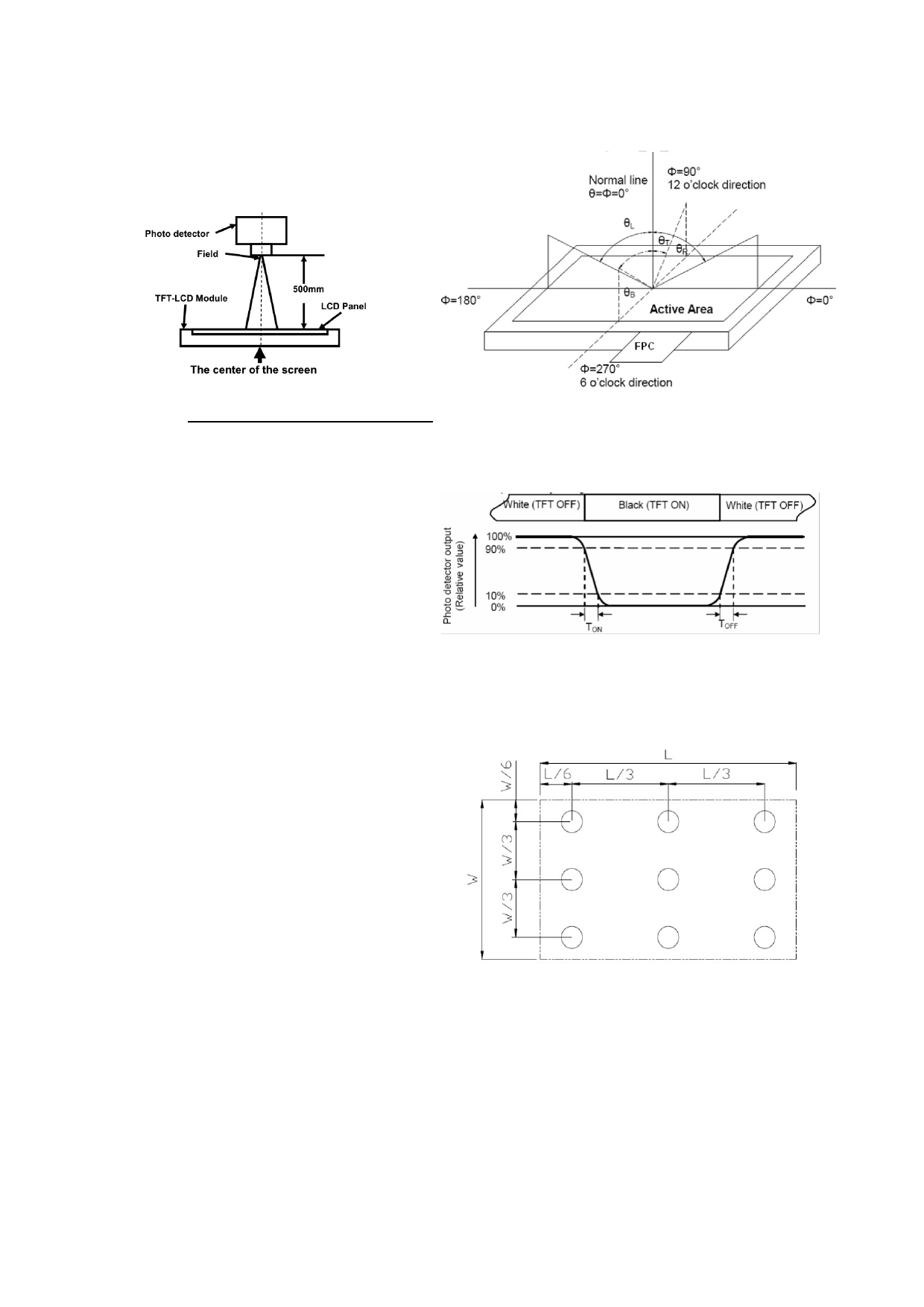
Note 1:Definition of optical measurement system
Note 2:Definition of viewing angle range and measurement system.
The optical characteristics should be measured in dark room. viewing angle is measured at the center point of the LCD.
After 5 Minutes operation, the optical properties are
measured at the center point of the LCD screen. All input
terminals LCD panel must be ground when measuring the
center area of the panel.
Note 3: Definition of contrast ratio
Contrast
Luminance When LCD is at “White” state
Note 4: Definition of Response time
Ratio(CR)
=
Luminance When LCD is at “Black” state
The response time is defined as the LCD optical switching time interval
“White state”: The state is that the LCD should drive by
between “White” state and “Black” state. Rise time (T ON ) is the time
Vwhite.
between photo detector output intensity changed from 90% to 10%.
“Black state”: The state is that the LCD should drive by
And fall time (T OFF ) is the time between photo detector output intensity
Vblack.
changed from 10% to 90%.
Vwhite: To be determined
Vblack: To be determined.
Note 5: Definition of color chromaticity (CIE1931)
Note 6: Definition of Luminance Uniformity
Color coordinates measured at center point of LCD.
Active area is divided into 9 measuring areas (Refer Fig. 2). Every
measuring point is placed at the center of each measuring area.
Luminance Uniformity (U) = Lmin/ Lmax
L-------Active area length W----- Active area width
L max : The measured Maximum luminance of all measurement position.
L min : The measured Minimum luminance of all measurement position.
Note 7: Definition of Luminance:
Measured the luminance of white state at center point.
URL: www.topwaydisplay.com
Document Name: HKT101AMC-C-Manual-Rev0.2.doc
Page: 9 of 16

TOPWAY
LCD Module User Manual
HKT101AMC-C
6. LCD Module Design and
7. 液晶显示模块设计和使用须知
Handling Precautions
- Please ensure V0, VCOM is adjustable, to enable LCD module get - 请注意 V0, VCOM 的设定, 以确保液晶显示模块在不同
the best contrast ratio under different temperatures, view angles
的使用温度下以及在不同的视角和位置观察模块显
and positions.
示,均能达到最佳对比度,请务必将应用电路上设置
为对比度可调。
- Normally display quality should be judged under the best contrast - 请注意液晶显示模块的显示品质判定是指在正常对比
ratio within viewable area. Unexpected display pattern may com out
度下以及视窗(V.A)范围内进行的,非正常对比度下液
under abnormal contrast ratio.
晶可能会出现非预期的显示不良,应注意区分。
- Never operate the LCD module exceed the absolute maximum - 请勿在最大额定值以外使用液晶显示模块。
ratings.
- Never apply signal to the LCD module without power supply.
- 请勿在没有接通电源的条件下,给液晶显示模块输送
信号。
- Keep signal line as short as possible to reduce external noise - 请尽可能缩短信号线的连接,以避免对液晶显示模块
interference.
的信号干扰。
- IC chip (e.g. TAB or COG) is sensitive to light. Strong light might - 集成电路因 IC 芯片(如 TAB 或 COG)对紫外线极为敏
cause malfunction. Light sealing structure casing is recommended.
感,强光环境下可能会引起液晶显示模块功能失效,
故应采用不透光的外壳。
- Make sure there is enough space (with cushion) between case and - 请在液晶显示模块与外壳之间保留足够的空间(可使用
LCD panel, to prevent external force passed on to the panel;
衬垫),以缓冲外力对液晶显示模块的损坏或因受力不
otherwise that may cause damage to the LCD and degrade its
均而产生的显示不匀等异常现象。
display result.
- Avoid showing a display pattern on screen for a long time - 避免液晶显示屏在某一画面下长时间点亮,否则有出
(continuous ON segment).
现残影的风险;请通过软件每隔一段时间改变一次画
面。
- LCD module reliability may be reduced by temperature shock.
- 液晶显示模块的可靠性可能因温度冲击而降低。
- When storing and operating LCD module, avoids exposure to direct - 请勿在阳光直射、高湿、高温或低温下储存和使用液
sunlight, high humidity, high or low temperature. They may damage
晶显示模块,这将造成液晶显示模块的损坏或失效。
or degrade the LCD module.
- Never leave LCD module in extreme condition (max./min - 请勿在极限环境(最大/最小存储/工作温度)下使用或
storage/operate temperature) for more than 48hr.
放置液晶显示模块超过 48 小时以上。
- Recommend LCD module storage conditions is 0 C~40 C - 液晶显示模块建议存储条件为: 0 C~40 C <80%RH 。
<80%RH.
- LCD module should be stored in the room without acid, alkali and - 请勿让液晶显示模块存储于带有 酸性, 碱性, 有害气
harmful gas.
体环境之中。
- Avoid dropping & violent shocking during transportation, and no - 在运输过程中, 请勿让液晶显示模块跌落与猛烈震动,
excessive pressure press, moisture and sunlight.
同时避免 异常挤压, 高湿度, 与阳光照射.
- LCD module can be easily damaged by static electricity. Please - 液晶显示模块极易受静电损坏,请务必保证液晶显示
maintain an optimum anti-static working environment to protect the
模块在防静电的工作环境中使用或保存。(如: 烙铁正
LCD module. (eg. ground the soldering irons properly)
确接地,等)
- Be sure to ground the body when handling LCD module.
- 拿取液晶显示模块时需注意操作人员的接地情况。
- Only hold LCD module by its sides. Never hold LCD module by - 请手持液晶显示模块的边沿取放模块,防止热压纸或
applying force on the heat seal or TAB.
TAB 部位受力。
- When soldering, control the temperature and duration avoid - 焊接液晶模块时,请注意控制烙铁的温度、焊接时
damaging the backlight guide or diffuser which might degrade the
间,以免烫坏导光板或偏光片,导致显示不匀等不良
display result such as uneven display.
现象发生。
- Never let LCD module contact with corrosive liquids, which might - 请勿使用洗板水等腐蚀性液体接触液晶模块,以免腐
cause damage to the backlight guide or the electric circuit of LCD
蚀导光板或模块电路。
module.
- Only clean LCD with a soft dry cloth, Isopropyl Alcohol or Ethyl - 仅可使用柔软的干布, 异丙醇或乙醇清洁液晶屏表
Alcohol. Other solvents (e.g. water) may damage the LCD.
面,其他任何溶剂(如:水)都有可能损坏液晶模块。
- Never add force to components of LCD module. It may cause - 请勿挤压液晶显示模块上的元器件,以避免产生潜在
invisible damage or degrade the module's reliability.
的损坏或失效而影响产品可靠性。
- When mounting LCD module, please make sure it is free from - 装配液晶显示模块时,请务必注意避免液晶显示模块
twisting, warping and bending.
的扭曲或变形。
- Do not add excessive force on surface of LCD, which may cause - 请勿挤压液晶显示屏表面,这将导致显示颜色的异
the display color change abnormally.
常。
- LCD panel is made with glass. Any mechanical shock (e.g. - 液晶屏由玻璃制作而成,任何机械碰撞(如从高处跌
URL: www.topwaydisplay.com
Document Name: HKT101AMC-C-Manual-Rev0.2.doc
Page: 10 of 16

TOPWAY
LCD Module User Manual
HKT101AMC-C
dropping from high place) will damage the LCD module.
落)均有可能损坏液晶显示模块。
- Protective film is attached on LCD screen. Be careful when peeling - 液晶屏表面带有保护膜, 揭除保护膜时需要注意可能
off this protective film, since static electricity may be generated.
产生的静电。
- Polarizer on LCD gets scratched easily. If possible, do not remove - 因液晶显示屏表面的偏光片极易划伤,安装完成之前
LCD protective film until the last step of installation.
请尽量不要揭下保护膜。
- When peeling off protective film from LCD, static charge may cause - 请缓慢揭除保护膜,在此过程中液晶显示屏上可能会
abnormal display pattern. The symptom is normal, and it will turn
产生静电线,此为正常情况,可在短时间内消失。
back to normal in a short while.
- LCD panel has sharp edges, please handle with care.
- 请注意避免被液晶显示屏的边缘割伤。
- Never attempt to disassemble or rework LCD module.
- 请不要试图拆卸或改造液晶显示模块。
- If display panel is damaged and liquid crystal substance leaks out, - 当液晶显示屏出现破裂, 内部液晶液体可能流出; 相
be sure not to get any in your mouth, if the substance comes into
关液体不可吞吃, 绝对不可接触嘴巴, 如接触到皮肤
contact with your skin or clothes promptly wash it off using soap
或衣服, 请使用肥皂与清水彻底清洗.
and water.
7. Case With Brackets Mounting ( 卡扣式安装 )
Front Mounting
前装产品
- Application panel opening:The suggested assemble gap should be - 应用面板开窗尺寸:建议每边安装间隙约 0.5~0.8mm
about 0.5~0.8mm on each side.
- Install the TFT module on strong flat surface for securing water and - 面板开窗部分要有足够的刚度和良好的平整度,以利安
sealing.
装及密封防水 .
- A silicon sealing ring ships with display module. It should be in
- 显示模块上的硅胶密封圈在安装时确保嵌入到位
place before assembling to the front panel.
- Pre-fixing: Slightly tighten the screws on beam clamp in sequence - 预紧:将卡扣螺钉按图示顺序稍加预紧 .
as picture on the right side.
- IFinal-fixing: Tighten the fixing screws on beam clamp in sequence - 紧固 : 再次按顺序用 0.3-0.5 N.m 扭力拧紧卡扣螺钉并 注意
as well with twist torque about 0.3-0.5N.m and put the beam clamp
卡扣置正无歪斜 .
straight.
Model/ 型号
A
B
R
T
HKT101AMC-C
258mm
177mm
1.0mm
0.3-0.5 N.m
URL: www.topwaydisplay.com
Document Name: HKT101AMC-C-Manual-Rev0.2.doc
Page: 11 of 16

TOPWAY
LCD Module User Manual
HKT101AMC-C
Warranty
This product has been manufactured to our company’s specifications as a part for use in your company’s general
electronic products. It is guaranteed to perform according to delivery specifications. For any other use apart from
general electronic equipment, we cannot take responsibility if the product is used in medical devices, nuclear power
control equipment, aerospace equipment, fire and security systems, or any other applications in which there is a direct
risk to human life and where extremely high levels of reliability are required. If the product is to be used in any of the
above applications, we will need to enter into a separate product liability agreement.
- We cannot accept responsibility for any defect, which may arise form additional manufacturing of the product
(including disassembly and reassembly), after product delivery.
- We cannot accept responsibility for any defect, which may arise after the application of strong external force to the
product.
- We cannot accept responsibility for any defect, which may arise due to the application of static electricity after the
product has passed our company’s acceptance inspection procedures.
- We cannot accept responsibility for intellectual property of a third part, which may arise through the application of
our product to our assembly with exception to those issues relating directly to the structure or method of
manufacturing of our product.
URL: www.topwaydisplay.com
Document Name: HKT101AMC-C-Manual-Rev0.2.doc
Page: 12 of 16

TOPWAY
LCD Module User Manual
HKT101AMC-C
Appendix A:
Modbus RTU Master Xml configure v1.01
配置文件 Modbus.xml 文档示例
<Modbus>
<config>
<relative vpaddr="0x080000" vplen="1" slaveID="1" mbaddr="0x40000" mblen="1"/>
<relative vpaddr="0x080002" vplen="1" slaveID="1" mbaddr="0x40001" mblen="1"/>
<relative vpaddr="0x080004" vplen="1" slaveID="1" mbaddr="0x40002" mblen="1"/>
<relative vpaddr="0x020000" vplen="1" slaveID="1" mbaddr="0x40008" mblen="2"/>
<relative vpaddr="0x080034" vplen="1" slaveID="1" mbaddr="0x4000A" mblen="1"/>
</config>
<global>
<Read condition = "always" vpaddr_condition="0x080004" value_condition="100"
slaveID="1" mbaddr ="0x40008" mblen= "2" />
<BLCtrl condition = "==" vpaddr_condition="0x080004" value_condition="100"
value_type="const" vpaddr_val ="64" />
<BeepCtrl condition = "==" vpaddr_condition="0x080004" value_condition="100"
value_type="variable" vpaddr_val ="0x80034" />
</global>
<Page PageNo="1">
<Read condition = "always" vpaddr_condition="0x080004" value_condition="100"
slaveID="1" mbaddr ="0x40000" mblen= "3" />
</Page>
</Modbus>
说明:
配置类
说明
功能
<config>
关系定义
relative
- 定义 VP 与 MB 的对应关系
- 当 VP 内容被修改 , 模块会同时拷贝相关内容到 MB
<global>
定义全局的周期性操作
Read
- 读 MB
- 可按条件操作
- 模块会参考 <config>, 同时拷贝相关值到 VP (*1)
Write
- 写 VP
< Page
定页面 n 中的周期性操
- 可按条件操作
PageNo=n> 作
- 模块会参考 <config>, 同时拷贝相关值到 MB(*1)
BLCtrl
- 背光亮度设定
- 可按条件操作
BeepCtrl
- 蜂鸣器控制
- 可按条件操作
注释 :
VP= 智能模块块中的 VP 变量 ( 含 地址 )
MB= MODBUS 变量 ( 含 从设备 , 从地址 )
注 :
*1. 相关 MB 关联 VP, 必须在 <config> 中定义
元素 <relative>: 描述屏工程中变量与 modbus 地址变量的映射关系
属性
描述
vpaddr
屏的变量地址
0x80000: 16 位数据变量
0x20000: 32 位数据变量
0x30000: 64 位数据变量
URL: www.topwaydisplay.com
Document Name: HKT101AMC-C-Manual-Rev0.2.doc
Page: 13 of 16

TOPWAY
LCD Module User Manual
HKT101AMC-C
vplen
变量个数,请填入 1
slaveID
操作的 Modbus Slave 设备 ID 号
mbaddr
Modbus 寄存器地址
0x coil : 地址 0x00000~0x0270F
1x input : 地址 0x10000~0x1270F
3x input Register : 地址 0x30000~0x3270F
4x holding Redister : 地址 0x40000~0x4270F
mblen
Modbus 地址数量 , 需要使 modbus 和 vpaddr 地址变量比特位相等
元素 <Read>: 依条件执行读取 Modbus 地址变量
属性
描述
condition
执行条件
"always",">","==","<","!=",">=","<="
vpaddr_condition 条件左值变量地址,参数为 16 进制数值以 "0x" 开头的屏变量地址
0x80000: 16 位数据变量
0x20000: 32 位数据变量
0x30000: 64 位数据变量
仅条件 ">","==","<","!=",">=","<=" 有效
value_condition
条件右值对比值,参数为 10 进制数值
slaveID
操作的 Modbus Slave 设备 ID 号
mbaddr
Modbus 寄存器地址
0x coil : 地址 0x00000~0x0270F
1x input : 地址 0x10000~0x1270F
3x input Register : 地址 0x30000~0x3270F
4x holding Redister : 地址 0x40000~0x4270F
mblen
Modbus 地址数量
元素 <BLCtrl>: 依条件执行控制屏背光亮度为常量或变量 vpaddr_val 的值
属性
描述
condition
执行条件
"always",">","==","<","!=",">=","<="
vpaddr_condition 条件左值变量 ,参数为 16 进制数值以 "0x" 开头
0x80000: 16 位数据变量
0x20000: 32 位数据变量
0x30000: 64 位数据变量
仅条件 ">","==","<","!=",">=","<=" 有效
value_condition
条件右值对比值,参数为 10 进制数值
value_type
操作值为常量或者变量
参数值可选 "const" , "variable"
vpaddr_val
Value_type ="const" 时,参数为 10 进制数值
Value_type ="variable" 时,参数为 16 进制数值以 "0x" 开头的屏变量地址
0x80000: 16 位数据变量
0x20000: 32 位数据变量
0x30000: 64 位数据变量
元素 <BeepCtrl>: 依条件执行控制蜂鸣器是否响 , 当常量值或变量 vpaddr_val 非 0 时蜂鸣器响 , 否则
反之。
属性
描述
URL: www.topwaydisplay.com
Document Name: HKT101AMC-C-Manual-Rev0.2.doc
Page: 14 of 16

TOPWAY
LCD Module User Manual
HKT101AMC-C
condition
执行条件
"always",">","==","<","!=",">=","<="
vpaddr_condition 条件左值变量地址,参数为 16 进制数值以 "0x" 开头的屏变量地址
0x80000: 16 位数据变量
0x20000: 32 位数据变量
0x30000: 64 位数据变量
仅条件 ">","==","<","!=",">=","<=" 有效
value_condition
条件右值对比值,参数为 10 进制数值
value_type
操作值为常量或者变量
参数值可选 "const" , "variable"
vpaddr_val
Value_type ="const" 时,参数为 10 进制数值
Value_type ="variable" 时,参数为 16 进制数值以 "0x" 开头的屏变量地址
0x80000: 16 位数据变量
0x20000: 32 位数据变量
0x30000: 64 位数据变量
元素 <Write>: 依条件执行写操作,将常量或变量 vpaddr_val 写入 vpaddr 指定的地址中
属性
描述
condition
执行条件
"always",">","==","<","!=",">=","<="
vpaddr_condition 条件左值变量地址,参数为 16 进制数值以 "0x" 开头的屏变量地址
0x80000: 16 位数据变量
0x20000: 32 位数据变量
0x30000: 64 位数据变量
仅条件 ">","==","<","!=",">=","<=" 有效
value_condition
条件右值对比值,参数为 10 进制数值
value_type
操作值为常量或者变量
参数值可选 "const" , "variable"
vpaddr_val
Value_type ="const" 时,参数为 10 进制数值
Value_type ="variable" 时,参数为 16 进制数值以 "0x" 开头的屏变量地址
0x80000: 16 位数据变量
0x20000: 32 位数据变量
0x30000: 64 位数据变量
vpaddr
需要写入操作的变量地址 , 对应屏变量地址
0x80000: 16 位数据变量
0x20000: 32 位数据变量
0x30000: 64 位数据变量
vplen
VP 地址数量
注:
mbaddr: 指 Modbus 寄存器地址
0x coil : 地址 0x00000~0x0270F
1x input : 地址 0x10000~0x1270F
3x input Register : 地址 0x30000~0x3270F
4x holding Register : 地址 0x40000~0x4270F
vpaddr : 指屏的变量
0x80000: 16 位数据变量,对应 modbus 1 个 3x 和 4x 地址 ,16 个 0x 和 1x 地址
0x20000: 32 位数据变量,对应 modbus 2 个 3x 和 4x 地址 ,32 个 0x 和 1x 地址
0x30000: 64 位数据变量,对应 modbus 4 个 3x 和 4x 地址 ,64 个 0x 和 1x 地址
URL: www.topwaydisplay.com
Document Name: HKT101AMC-C-Manual-Rev0.2.doc
Page: 15 of 16

TOPWAY
LCD Module User Manual
HKT101AMC-C
屏变量与 modbus 位地址的关系以 16 位变量对应关系为例
16 位变量 Bit15
Bit8
Bit7
Bit0
0x coil
0x0000F
0x00008 0x00007
0x00000
1x input
0x1000F
0x10008 0x10007
0x10000
URL: www.topwaydisplay.com
Document Name: HKT101AMC-C-Manual-Rev0.2.doc
Page: 16 of 16