
How to Choose a TFT Display for Excavators, Bulldozers, and Heavy Equipment: An Engineer's Guide
Designing a Human-Machine Interface (HMI) for off-highway vehicles requires a fundamental shift in mindset from traditional electronics design. An excavator, wheel loader, or forestry machine presents one of the most hostile environments for an LCD module. The display must survive continuous low-frequency vibration, massive temperature swings, high ambient sunlight, and operator abuse, all while accurately reporting critical machine states.
1. What Makes Heavy Equipment Displays Different from Consumer Displays?
Engineers transitioning from consumer electronics or standard indoor industrial design often underestimate the demands placed on a vehicle HMI display. A consumer tablet is designed for a controlled 10°C to 30°C environment, features a lifespan optimized for 2 to 3 years, and utilizes high-gloss glass that acts like a mirror in direct sunlight.
In heavy equipment, the display is a safety-critical component. If the screen fails, the operator cannot read the engine coolant temperature, hydraulic pressure, or rear-view camera feeds, grounding a machine that costs thousands of dollars an hour to operate.
Heavy equipment displays require:
- Extended product lifecycles: Equipment is manufactured for 5 to 10 years and serviced for 15. The display cannot face End of Life (EOL) for at least 10 years.
- High luminance and wide viewing angles: Heavy Equipment cabins consist largely of glass. The screen must overpower ambient sunlight and remain visible as the operator shifts in his seat.
- Industrial-grade interfaces: Short-run TTL interfaces are highly susceptible to noise. Industrial displays rely on differential signaling (LVDS) to cross the cabin while resisting electromagnetic interference (EMI).
- Thermal resilience: A bulldozer parked overnight in a Canadian winter or a wheel loader operating in an Arizona sunny summer day will expose the display to temperatures far outside consumer limits.
Engineering Takeaway: Never specify a commercial-grade tablet or consumer TFT for off-highway equipment. The initial cost savings will be entirely consumed by warranty claims, field replacements, and frustrated operators.
2. Operating Challenges Inside Excavators and Bulldozers
Understanding the physical environment is the first step in display selection. The cabin of heavy machinery introduces a specific matrix of challenges.
Sunlight and Glare
Excavator and forestry machine cabins are effectively glass boxes designed for maximum visibility. Direct sunlight washing out the screen is the primary complaint from operators. A standard 300-nit display will appear completely black in these conditions. Furthermore, the greenhouse effect inside the cabin can drive localized temperatures immediately behind the glass well above the ambient outdoor air temperature.
Continuous Shock and vibration
Diesel engines and hydraulic pumps generate constant low-frequency vibration. Tracked vehicles like bulldozers transmit high-impact shock through the chassis when traversing rocky terrain. Connectors can vibrate loose, heavy components on the PCB can suffer fatigue failures, and the LCD glass itself can crack if mounted too rigidly against the bezel.
Wide Temperature Swings
Equipment must turn on and function reliably whether it is -20°C or +70°C. At extremely low temperatures, the liquid crystals in standard displays lose their viscosity, resulting in severe ghosting and unacceptably slow response times. At high temperatures, backlight LEDs degrade rapidly if their thermal path is insufficient.
Operator Interaction
Operators wear thick, dirt-covered, or wet gloves. They stab at the screen rather than tapping it. The touch panel must be tuned to reject water droplets, ignore dirt accumulation, and register inputs through heavy leather or nitrile.
3. Engineering Checklist Before Choosing a TFT Display
When evaluating an LCD module for an operator cabin display, use this baseline checklist to filter out unsuitable candidates:
- Luminance: Minimum 800 nits. Anything less will struggle in daylight.
- Contrast Ratio: Minimum 600:1 to ensure readability of text and icons.
- Viewing Angle: 85/85/85/85 degrees (Full viewing angle).
- Operating Temperature: -20°C to +70°C minimum.
- Backlight Life: 50,000 hours minimum to half-brightness.
- Interface: LVDS for video; USB or ruggedized I2C for touch.
- Touch Panel: Projected Capacitive (PCAP/CTP) with a chemically strengthened cover glass.

4. Why the LMT101DNLFWD-NND-1 Fits Heavy Equipment Applications
To illustrate how specifications translate to field performance, we will analyze the TOPWAY LMT101DNLFWD-NND-1, a 10.1-inch LCD module explicitly suited for off-highway vehicle HMI.
Form Factor and Resolution
At 10.1 inches diagonal with an active area of 216.96 x 135.60 mm, the display offers substantial real estate for complex graphical clusters (engine RPM, fuel, hydraulic temps, and camera feeds). The 1280 x 800 (WXGA) resolution provides a 16:10 aspect ratio, which is highly preferred in industrial applications over 16:9 as it offers more vertical space for gauge rendering.
Optical Performance
The module features a luminance of 850 cd/m2 (nits). This crosses the threshold into "sunlight readable" territory. Crucially, the display utilizes a "Normally Black" a-Si TFT structure.
- Why it matters: In a Normally Black display, when a pixel is unpowered, it blocks light. This yields a much higher contrast ratio (800:1 typical) and darker blacks compared to older TN (Normally White) panels. When an operator is viewing the screen in direct sunlight, high contrast is just as important as raw brightness for legibility.
- Full Viewing Angle: The specification lists 85 degrees across all four axes (Top, Bottom, Left, Right). Operators rarely sit perfectly still or perfectly centered. An 85-degree viewing angle ensures colors do not invert and contrast does not collapse when the operator leans sideways to look out the window.
Environmental Resilience
The operating temperature of -20°C to +70°C, and storage up to +80°C, matches the requirements for non-climate-controlled vehicle cabins. The backlight is driven by a White LED array rated for 50,000 hours.
Why it matters: 50,000 hours equals nearly 6 years of continuous 24/7 operation, or well over 10 years of standard shift work, ensuring the display outlasts the standard maintenance cycle of the machine.
Capacitive Touch with USB
The LMT101DNLFWD-NND-1 features a Capacitive Touch Panel (CTP) with a dedicated USB interface (D+, D-) on a separate connector. USB is highly advantageous in vehicle architecture because it is natively supported by Linux, Android, and Windows embedded systems without requiring custom low-level driver development, and it handles longer cable runs far better than I2C.
5. Real Integration Consideration
Selecting the right datasheet is only 20% of the engineering task. How the display is integrated mechanically and electrically dictates its survival in the field.
Power Sequencing and LVDS
Improper power sequencing is a leading cause of intermittent LCD failure and latch-up. The controller board must follow the strict timing sequence outlined in the display's manual:
- Apply VDD (3.3V) and wait for it to stabilize (Tp1: max 1.6ms).
- Wait a minimum of 10ms before initiating the LVDS signal.
- Ensure the signal is stable for at least 200ms before asserting the backlight enable (LED_EN).
- Apply the PWM dimming signal.
Failure to follow this sequence can cause the TFT source drivers to enter an undefined state, resulting in a white screen, vertical lines, or permanent hardware damage.
For the video data, LVDS (Low-Voltage Differential Signaling) is used. It transmits data over twisted pairs (IND0 to IND3, plus clock). Because the signals are differential, they reject the common-mode noise generated by the vehicle's alternators and hydraulic solenoids. When laying out the carrier board, engineers must strictly match the impedance of these traces (typically 100 ohms differential) and keep the LVDS cable as short as possible.
Backlight Dimming (PWM)
An 850-nit display is excellent at noon but will blind the operator during a night shift. The LMT101DNLFWD-NND-1 features a dedicated LED_PWM pin accepting a 200Hz to 10kHz frequency.
Integration Tip: Connect this PWM pin to the vehicle's ambient light sensor or the main CAN bus dimming variable. Ensure the PWM frequency does not conflict with the vehicle's camera frame rates, which could cause visible banding or flickering on the camera feed.
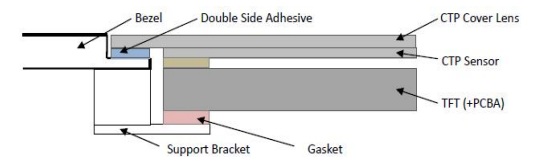
Mechanical Mounting and Stress
Heavy equipment vibrates violently. If the LCD module is bolted rigidly to a metal chassis, the chassis will transfer torsion directly into the 11.9 mm thick display module. Glass does not bend; it breaks.
- Bezel Mounting: As datasheet guidelines dictate using a gasket (0.5 to 1.0mm thick) between the bezel and the CTP surface. This gasket acts as a shock absorber.
- Clearances: Ensure the bezel window is at least 0.5mm larger than the active area on all sides. Do not allow hard plastics or metals to touch the edge of the cover glass.
- Rear Support: For industrial environments, do not rely solely on the front adhesive. Provide a padded support bracket on the rear of the TFT to prevent the module from bouncing during high-impact shocks.
6. Common Causes of Display Failure
Field experience in construction machinery reveals that displays rarely fail due to spontaneous component death. They fail due to environmental oversights during the design phase.
- Thermal Degradation of LEDs: If the HMI enclosure is sealed for IP67 waterproof ratings, the 6.6W of heat generated by the backlight has nowhere to go. If the ambient temperature inside the enclosure exceeds the maximum limits, the LEDs will dim permanently, degrading from 850 nits to 400 nits in a matter of months. Solution: Thermally couple the back of the LCD to an aluminum chassis acting as a heatsink.
- Mura (Clouding) from Mechanical Stress: If the mounting screws are overtightened, or if the enclosure warps in the sun, pressure is applied to the rear of the TFT. This disrupts the uniform gap between the glass substrates, creating yellow or white cloudy spots on the screen. Solution: Use compliant mounting methods and adhere to the zero-twist constraints.
- FPC Tearing: The Flexible Printed Circuits (FPCs) connecting the touch panel or LCD to the main board can tear due to continuous vibration. Solution: Secure all cables with ruggedized tapes, RTV silicone, or dedicated mechanical clamps. Never let a cable hang under its own weight.
- Touch Controller EMI: Electrical noise from wiper motors or radio transmitters can inject noise into the capacitive touch sensor, causing "ghost touches." Solution: Ensure all VSS (ground) pins on the CTP terminal are routed to a clean, robust system ground. Implement software debouncing where necessary.
7. Procurement Checklist
Commodity managers and strategic purchasers must evaluate the display manufacturer alongside the datasheet. Consumer display factories retool lines frequently, making them unsuitable for heavy equipment platforms.
When auditing a supplier for a machine control display, verify:
- Revision Control: Will the supplier guarantee no undocumented changes to the bill of materials (BOM)? A change in the touch controller IC or display driver can break the embedded operating system.
- Product Change Notifications (PCN): Does the supplier have a formal PCN process requiring 6 to 12 months' notice before a component change?
- Long-Term Availability: Will the panel be manufactured for the next 5 to 7 years?
- Quality Control (IQC/FQC): Does the supplier have strict incoming and final quality control to ensure backlight uniformity and color chromaticity (e.g., maintaining the x/y color coordinates within the specified tolerances) across different production batches?
Procurement Takeaway: A slightly higher unit cost from a dedicated industrial display manufacturer is an insurance policy against supply chain disruption and catastrophic field failures.
8. Comparison Table: Display Grades
To clarify why industrial modules are necessary, compare the standard specifications across three common display grades.
| Feature | Commercial Tablet TFT | Automotive TFT | Heavy Machinary TFT |
| Luminance | 300 - 400 nits | 600 - 800 nits | 850+ nits |
| Operating Temp | 0°C to +40°C | -40°C to +85°C | -20°C to +70°C (Wide Industrial) |
| Backlight Lifespan | 20,000+ hours | 30,000+ hours | 50,000+ hours |
| Interface | MIPI DSI / eDP | FPD-Link / GMSL | LVDS |
| Lifecycle | 1-2 years | 5-7 years | 5-10 years |
| Vibration Tolerance | Low | High | Very High (proper integration) |
9. Frequently Asked Questions
Why do excavators need high brightness displays?
Excavator cabins feature large glass windows. Direct sunlight causes glare that washes out standard screens. A minimum of 800-850 nits is required to overpower ambient light and allow the operator to read critical safety gauges.
Why is LVDS preferred over RGB or TTL in heavy machinery?
TTL/RGB interfaces send signals as single-ended voltages, which act like antennas, picking up electromagnetic interference (EMI) from the vehicle's engine and hydraulics. LVDS uses differential pairs, which cancel out ambient electrical noise, allowing for longer, cleaner cable runs inside the dashboard.
How does vibration affect LCD selection?
Continuous low-frequency vibration can cause standard connectors to loosen, FPC cables to tear, and internal glass substrates to separate. Industrial displays are built with robust internal frames, and engineers must mount them using shock-absorbing gaskets to isolate the glass from chassis vibration.
What operating temperature is required for off-highway equipment?
At a minimum, displays should support -20°C to +70°C. Equipment is often left outdoors year-round. Cold temperatures cause slow pixel response (ghosting), while extreme heat degrades the LED backlight lifespan if not managed properly.
Can capacitive touch work with heavy operator gloves?
Yes, but the touch controller must be specifically tuned by the manufacturer. Industrial capacitive touch controllers increase sensitivity and utilize algorithms to differentiate between a thick leather glove and unintended inputs like water droplets or dirt.
What is the difference between TN and IPS/Normally Black displays?
TN (Twisted Nematic) displays usually have poor viewing angles, where colors invert if viewed from below. Normally Black (or IPS-type) displays offer full viewing angles (e.g., 85 degrees in all directions), maintaining contrast and color accuracy regardless of where the operator is sitting.
How much brightness is enough inside a wheel loader?
While 500 nits is fine for a covered tractor, wheel loaders with wide-open greenhouses require 800 to 1000 nits. The LMT101DNLFWD-NND-1, at 850 nits, sits squarely in the recommended range for these vehicles.
What causes LCD failures in heavy equipment?
The most common failures are mechanical stress (cracked glass from rigid mounting), thermal death of the backlight (due to trapped heat inside sealed waterproof enclosures), and torn flex cables from improper vibration mitigation.
How should a display be mounted to survive vibration?
Never bolt the display directly to a rigid metal frame. Use a 0.5mm to 1.0mm foam or rubber gasket between the bezel and the screen, provide rear support with a soft pad, and leave a 0.3mm to 0.5mm expansion gap around the edges of the cover glass.
What is optical bonding and is it necessary?
Optical bonding injects a clear resin between the LCD surface and the touch glass, removing the air gap. This eliminates internal reflections, vastly improving sunlight readability and preventing condensation buildup. While not always strictly necessary for 850+ nit displays, it is highly recommended for premium machinery.
How important is power sequencing for an LCD?
Critical. Applying a video signal before the logic voltage (VDD) stabilizes can cause latch-up, drawing excessive current and permanently destroying the display's source driver ICs.
What is the acceptable display lifetime for construction equipment?
Construction equipment is an expensive capital asset. Displays should have a backlight half-life of at least 50,000 hours, ensuring the screen remains bright for roughly a decade of standard operational shifts.
How do you control backlight brightness at night?
Industrial displays feature a PWM (Pulse Width Modulation) pin. By sending a square wave (usually between 200Hz and 10kHz) from the vehicle's controller, the display can be dimmed smoothly to prevent blinding the operator during night operations.
Why use USB for the touch panel instead of I2C?
USB is heavily standardized and natively supported by operating systems like Linux and Android without writing custom I2C drivers. Additionally, USB handles longer cable routing through noisy vehicle dashboards much better than I2C.
How do buyers evaluate LCD suppliers for heavy equipment?
Buyers prioritize long product lifecycles, rigorous change control (no unannounced component swaps), comprehensive environmental testing data (IQC/FQC), and engineering support to assist with EMI and thermal integration.
For specific implementation details, mechanical step files, or evaluation samples, engineering teams should reference the complete LMT101DNLFWD-NND-1 datasheet and coordinate with Topway Display's technical support team early in the HMI architecture phase.